Gittan
Download

Free, native git client

Understandevery change.

Then commit it. Gittan, the Git Tree Analyzer & Navigator, is a free, native git client built around the diff.

Download

Free and open source · macOS, Windows and Linux, and more

  • FreeOpen source on GitHub.
  • NativemacOS, Windows, Linux and more, from one code base.
  • Your gitRuns git 2.30 or later, set up as you have it.
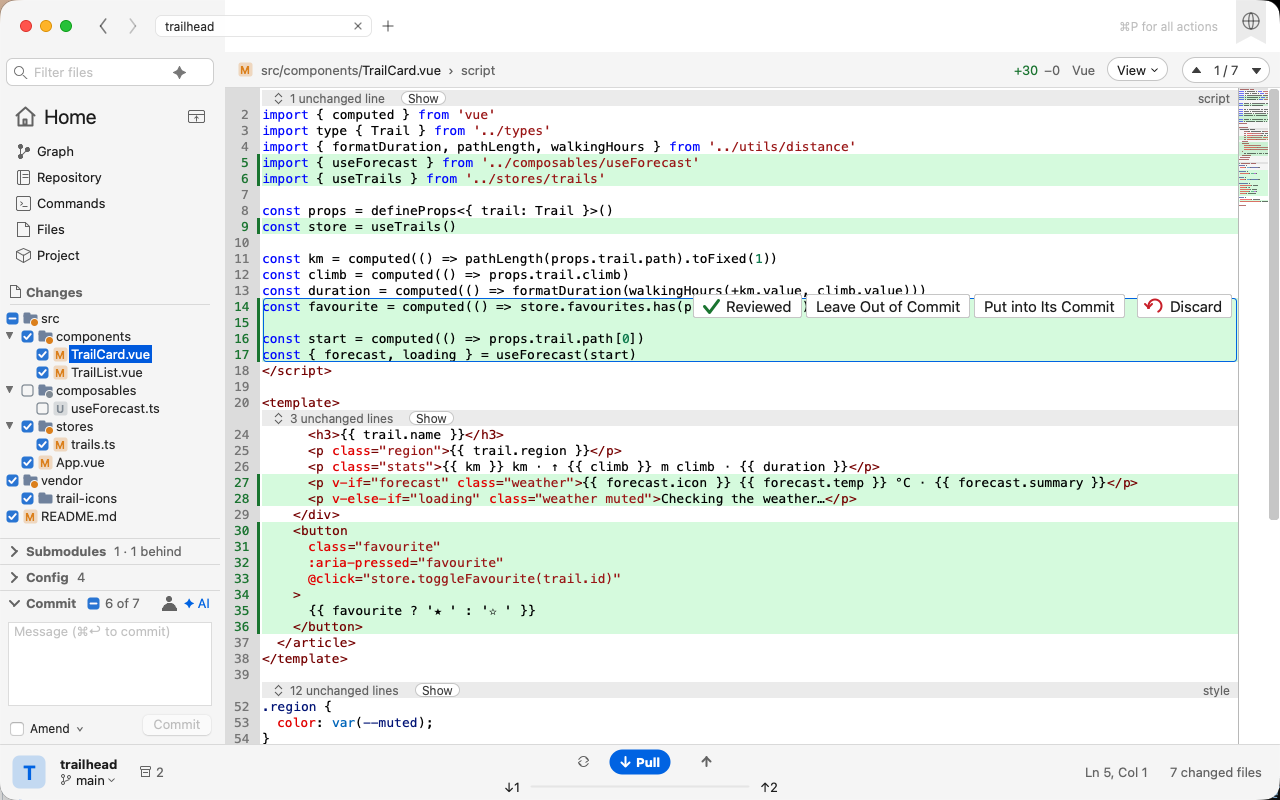
Gittan showing the changes to a Vue component: Home over Graph, Repository, Commands, Files and Project in the sidebar, the changed files with check boxes under them, the diff with only the changed lines and a few around them, the block under the mouse framed with Reviewed, Leave Out of Commit, Put into Its Commit and Discard pills at its first row, the Commit section under the tree, and the status bar with the repository, its branch and a Pull button over one commit behind and two ahead

Only here

What I haven't found anywhere else

Most of what Gittan does, every git client does. These things I have not found in TortoiseGit, SourceTree, Fork, GitKraken, Tower or the git views of the IDEs. If you know one that has it, tell me and I will take the line out.

Put a change into the commit it belongs to

Hover a change and press Put into Its Commit: Gittan finds the commit of your branch that last wrote those lines and folds the change into it, so a round of fixes lands in the commits it fixes, not in a “fixes” commit on top. Pushed commits are never rewritten, and Undo takes it back. The command line has git absorb; no client I know has it.
See it in the change view

Undo for what git did

Branch > Undo takes back a commit, an amend, a merge, a reset, a rebase or a switch, named after what it was, and Redo does it again. It follows what git did in a terminal too.

Read more

Reviewed, and gone

A change you have read gets Reviewed and turns into plain code for the rest of the session, so the diff shrinks to what you have not looked at yet. The file and git are not touched.

Read more

Tour

A closer look

A small Vue and TypeScript project as Gittan shows it: a few changes not committed yet, two commits not pushed, and a submodule that moved on.

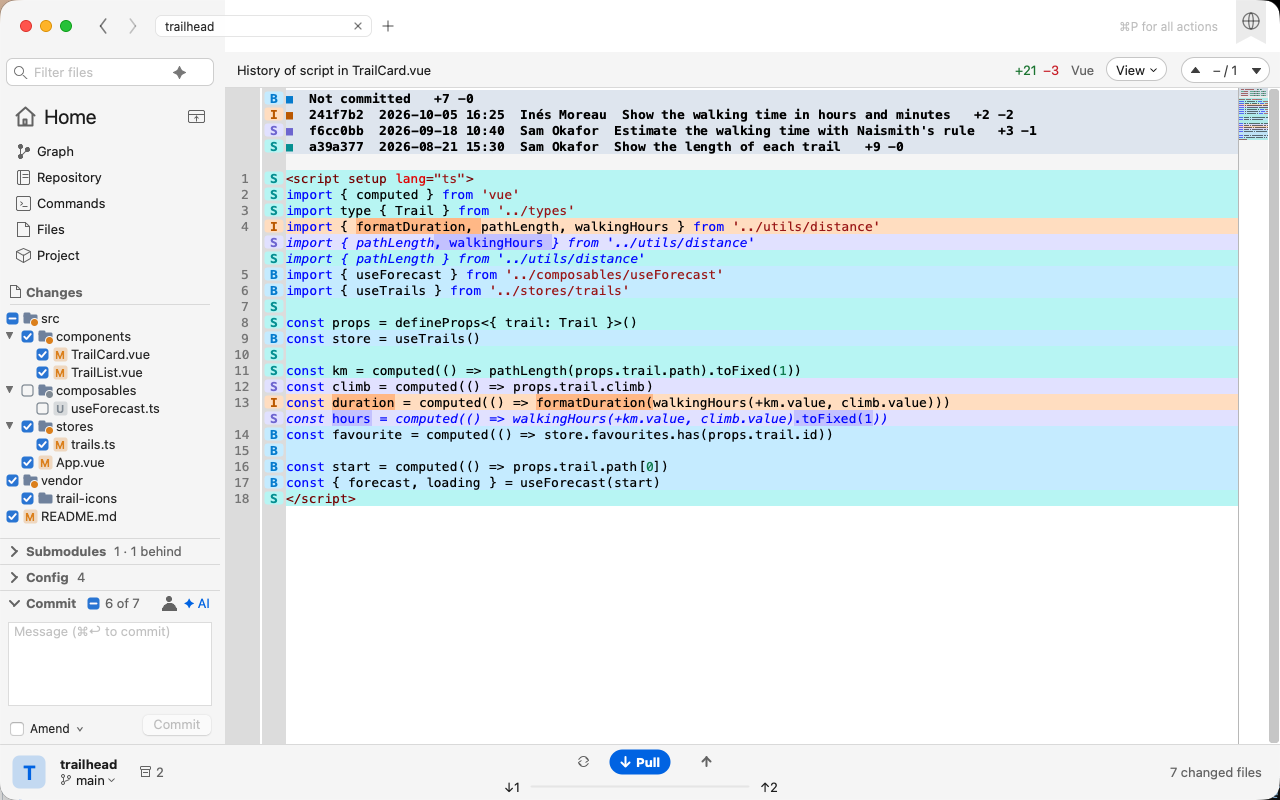
Code History lays the earlier versions of each line under the line itself, one color per commit, for the lines you select or the function the caret is in. In this component's script the import of the distance helpers has had three versions, and the duration two.
History of the script in TrailCard.vue: three commits and the change not committed yet listed at the top, each with its own color and the author's initial, and the earlier versions of each line shown under it in that color
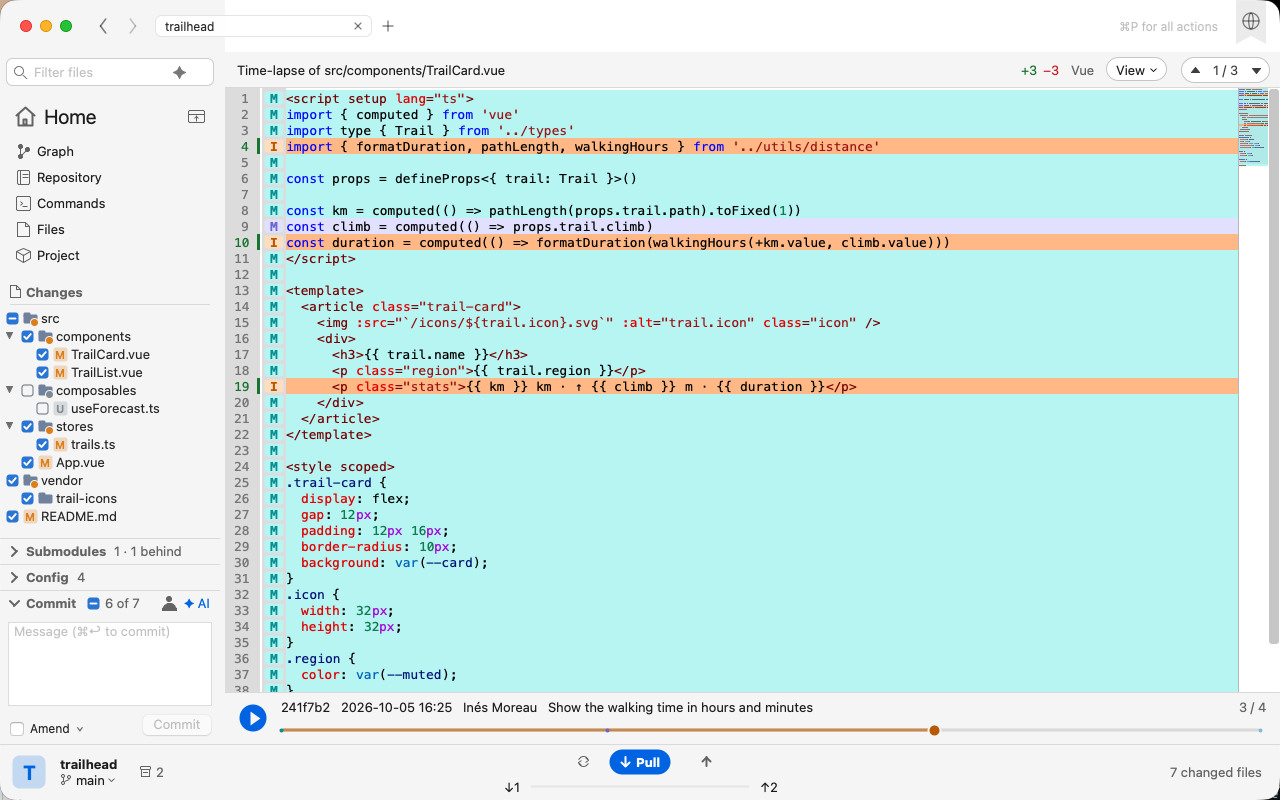
Time-lapse (⌘⌥H) plays a file through its history, oldest first: each version as it was, with the lines that commit changed marked in its author's color. Pause it, step it, or drag the track to a version.
Time-lapse of TrailCard.vue paused at version 3 of 4, Show the walking time in hours and minutes by Inés Moreau: the import, the duration and the stats lines that commit changed marked in orange, and a play button and a track with four marks under the file
Blame puts who last changed each line, and how long ago, in a column beside the diff. Click a cell to compare that commit with its parent.
The diff of TrailCard.vue with a blame column naming the author and age of each line, and Not committed beside the new lines
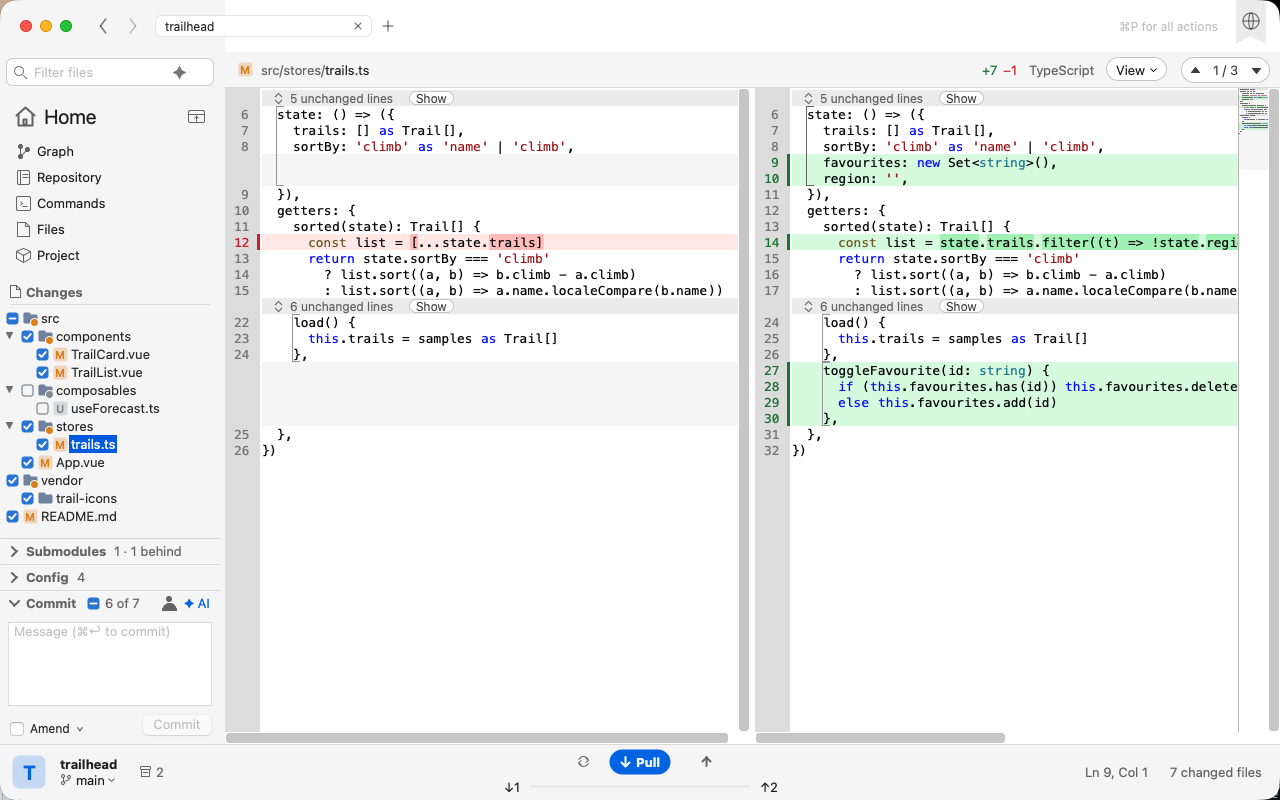
Side by side: the old file on the left, the new one on the right, scrolled in step and numbered from their own files. Changed words are marked within a line.
The side-by-side diff of stores/trails.ts, the old version on the left and the new one on the right, with the changed words marked in the line that now filters by region
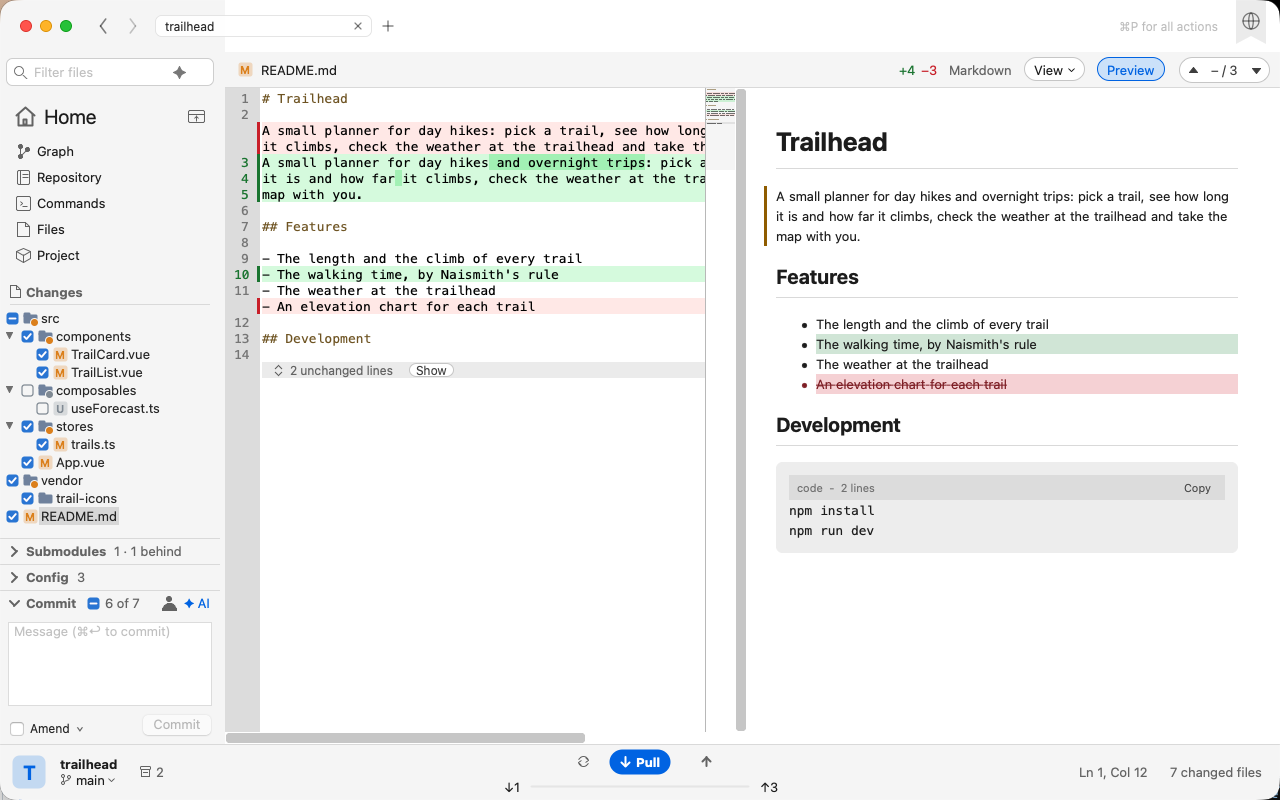
Preview draws a Markdown, HTML or SVG file beside its diff, as it will read, with no browser engine, and marks on the page what changed: a bar beside a reworded paragraph, new items in green, removed ones struck through. A changed SVG is drawn before and after. The pill in the file header turns it on and off.
README.md with its diff on the left and the rendered page on the right: the reworded paragraph with an amber bar beside it, the new feature The walking time, by Naismith's rule tinted green, the removed An elevation chart for each trail struck through in red, and the npm commands in a code block, with a Preview pill lit in the file header
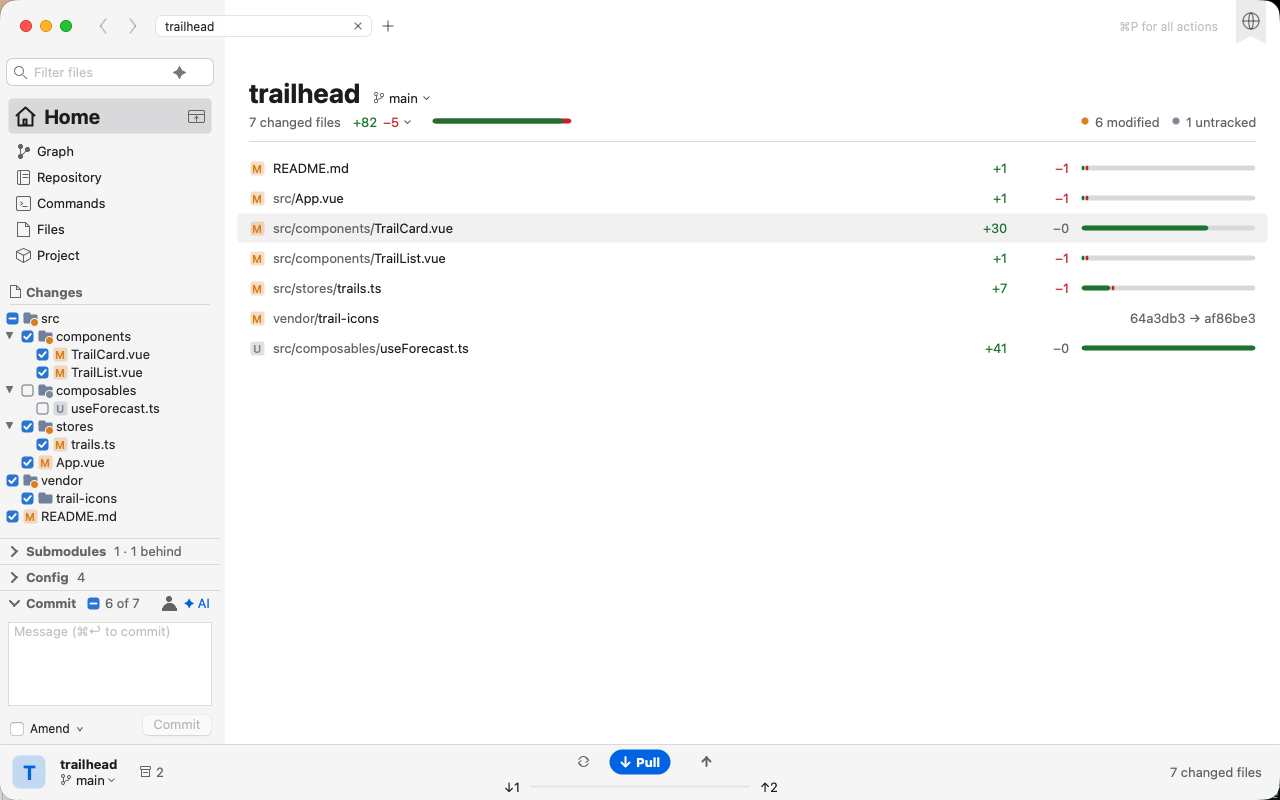
The summary is the Home of the sidebar: every changed file with its counts and a bar, and for a submodule the commits it moved between. The status bar under it names the repository and its branch, and its middle button is always the next step: Pull here, or Push, Resolve, Continue or Commit Merge.
The repository summary: seven changed files with added and deleted line counts and bars, and a submodule moved from 64a3db3 to af86be3; Home heads the sidebar over Graph, Repository, Commands, Files and Project, and the status bar offers Pull with one commit behind and two ahead
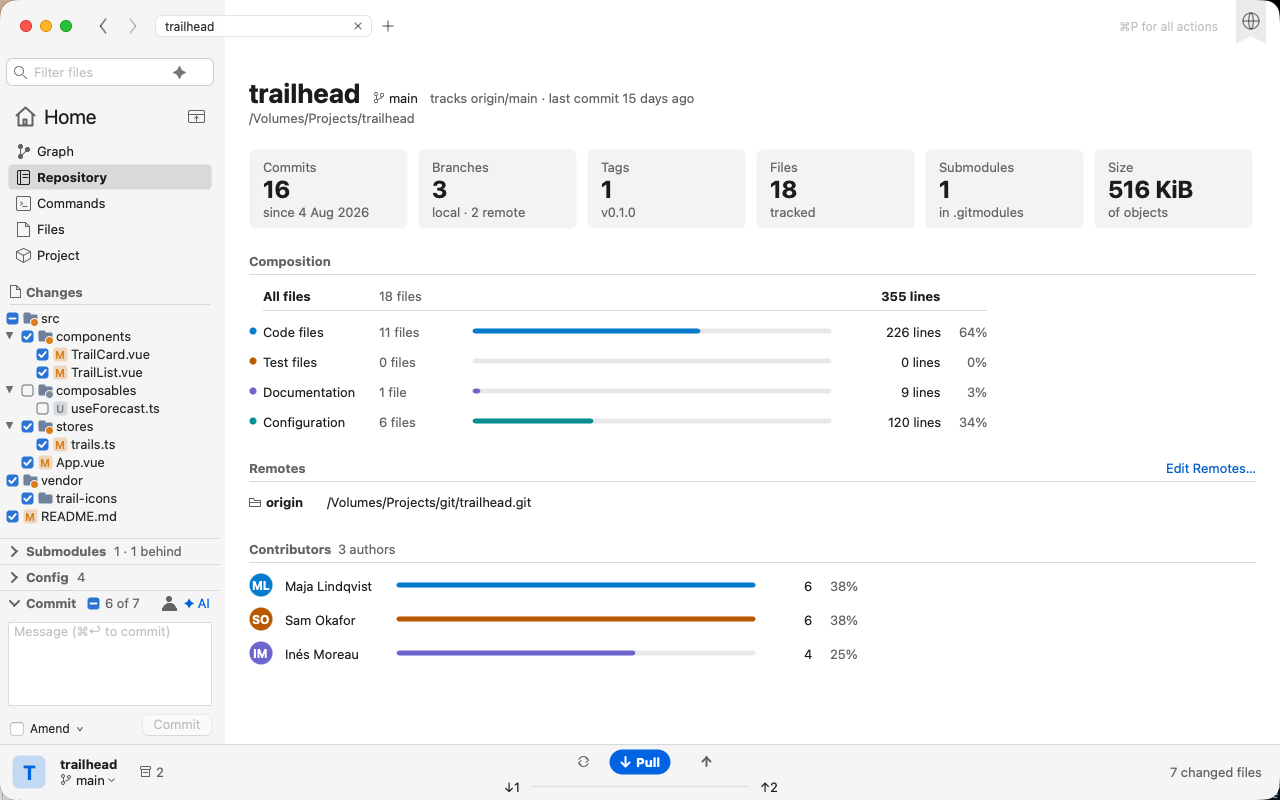
The Repository page (⌘⇧I) sums up the repository itself in tiles that lead on: Commits opens the graph, Branches and Tags drop their lists, Files opens the Files page at HEAD. Under them the composition counts the code, test, documentation and configuration files and their lines. The remotes can be edited from here, and a click on an author shows their commits.
The Repository page of trailhead: main tracking origin/main with the last commit 15 days ago, tiles for 16 commits since 4 Aug 2026, 3 branches, the tag v0.1.0, 18 tracked files, one submodule and 516 KiB, then the composition: 355 lines in all, 11 code files with 226 lines, no test files, one documentation file and 6 configuration files with 120 lines, each with a bar, then the origin remote with Edit Remotes and three contributors with their share of the commits
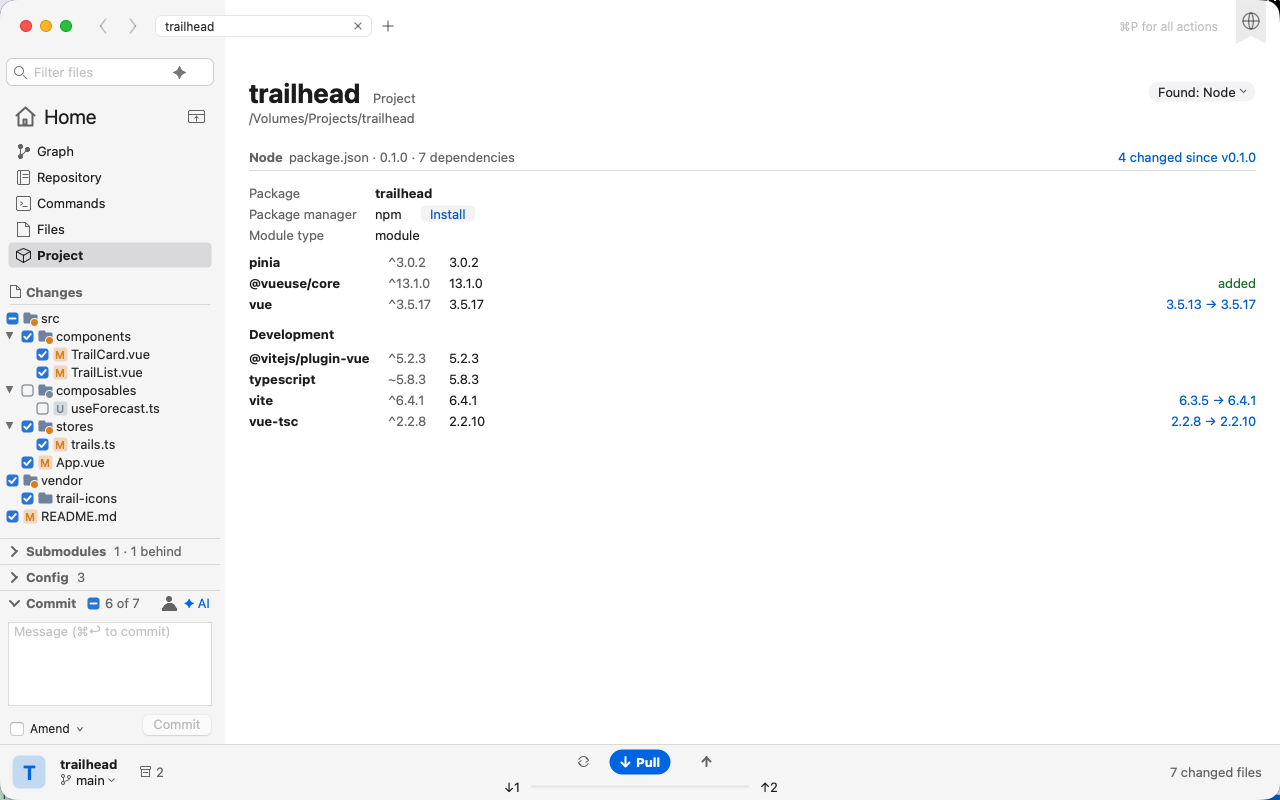
The Project page (Project in the sidebar, or ⌘⌥7) reads the repository as its own tools do, for Lazarus, Node, Rust, Go and Python: here trailhead, a Node project, its package manager with an Install button, and each dependency as package.json asks for it and as the lock file resolved it, with what was added and what moved since the tag v0.1.0. A Lazarus project shows its build modes with a Build button each and where every package comes from.
The Project page of trailhead: Node, package.json, 0.1.0, 7 dependencies and 4 changed since v0.1.0; the package trailhead, the package manager npm with an Install button and the module type module; the dependencies pinia, @vueuse/core, marked added, and vue, moved from 3.5.13 to 3.5.17; and under Development @vitejs/plugin-vue, typescript, vite, moved from 6.3.5 to 6.4.1, and vue-tsc, moved from 2.2.8 to 2.2.10, each with the version asked for and the version resolved
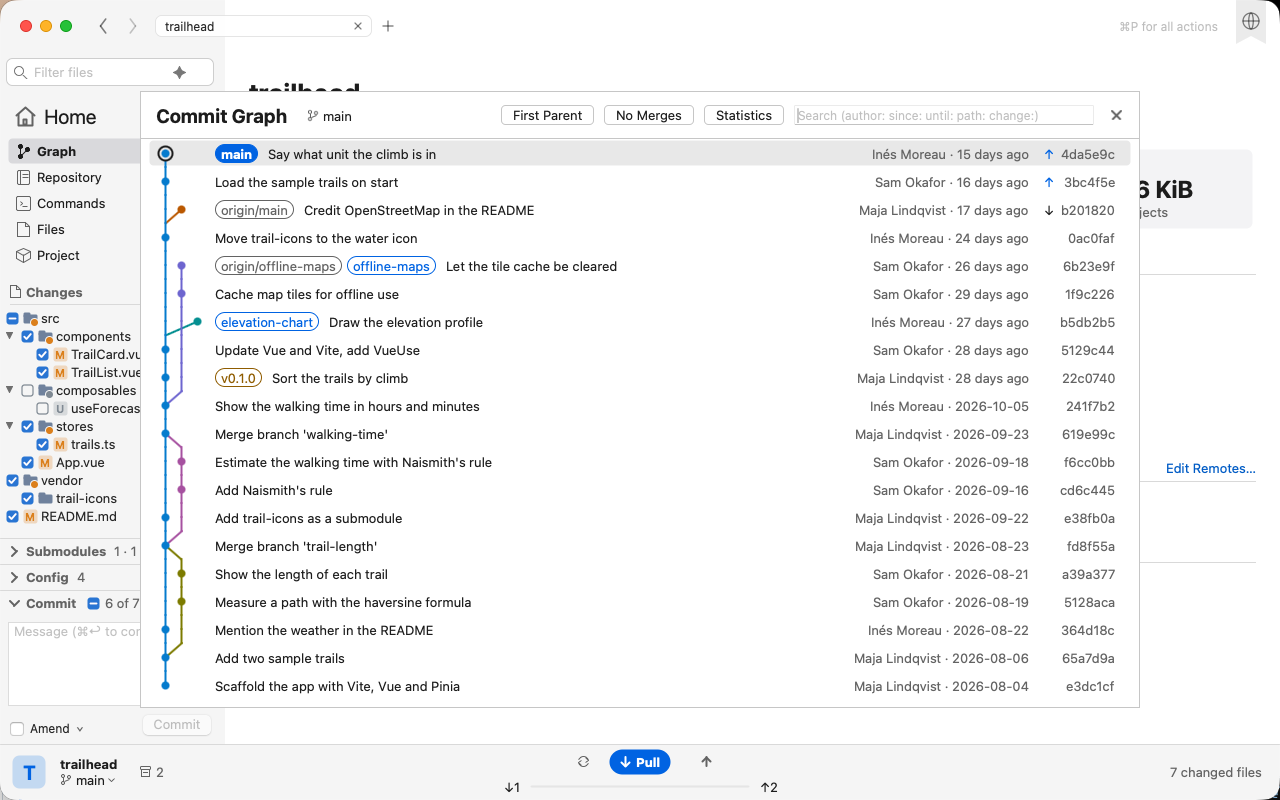
The commit graph (Graph in the sidebar, or ⌘⌥3) draws every branch and tag, marks the commits not pushed and the ones waiting on the remote, shows any commit against its parent with a click, and filters as you type in its search field. First Parent follows only the main line through each merge, and No Merges leaves the merges out. Drag a commit onto your branch's row to merge it.
The commit graph with First Parent, No Merges, Statistics and a search field in its header: main two commits ahead and one behind origin/main, the offline-maps branch on the remote, elevation-chart only local, the tag v0.1.0, and two merged branches
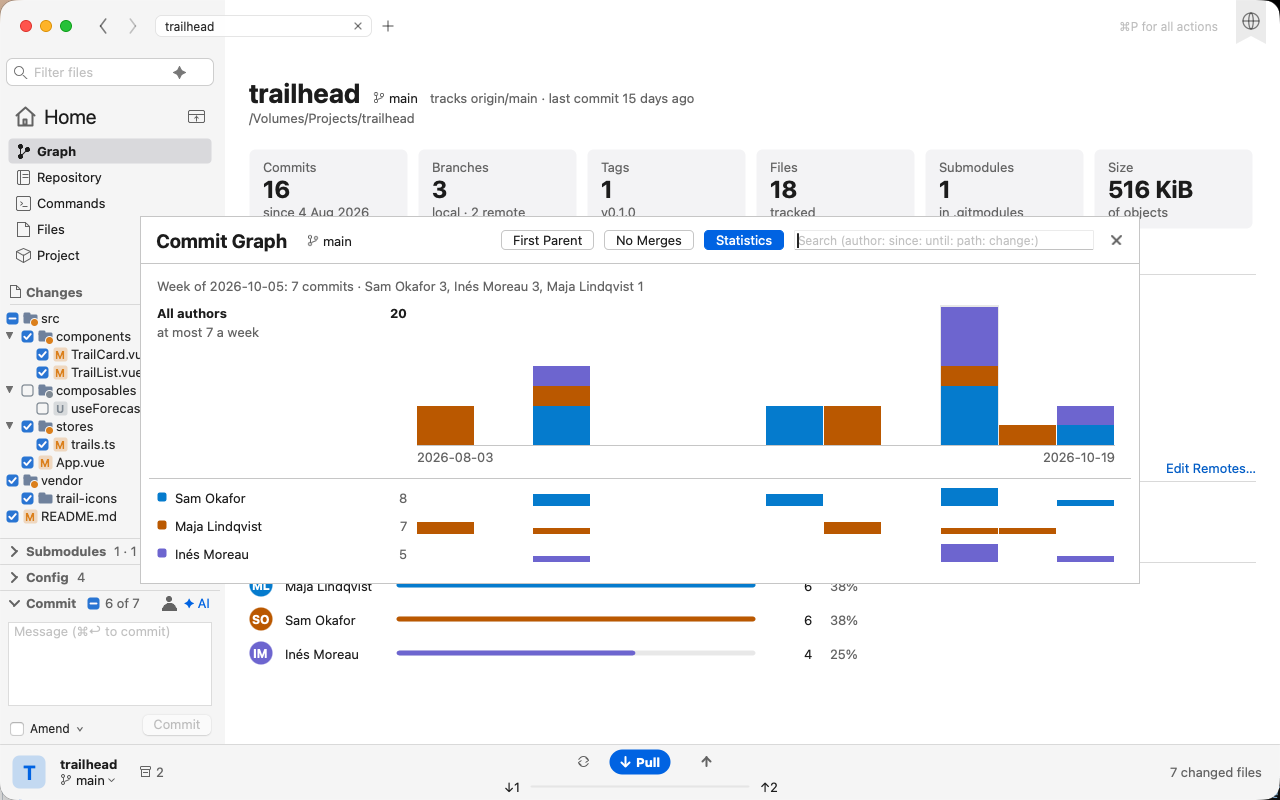
Statistics turns the graph into the commits per week, stacked by author, with a row of weeks for each author. The search applies, and a click on an author narrows the log to them.
The commit graph's statistics: 20 commits by 3 authors as weekly bars from August to October stacked in each author's color, the week of 5 October under the mouse with seven commits, and rows for Sam Okafor, Maja Lindqvist and Inés Moreau with their own weeks
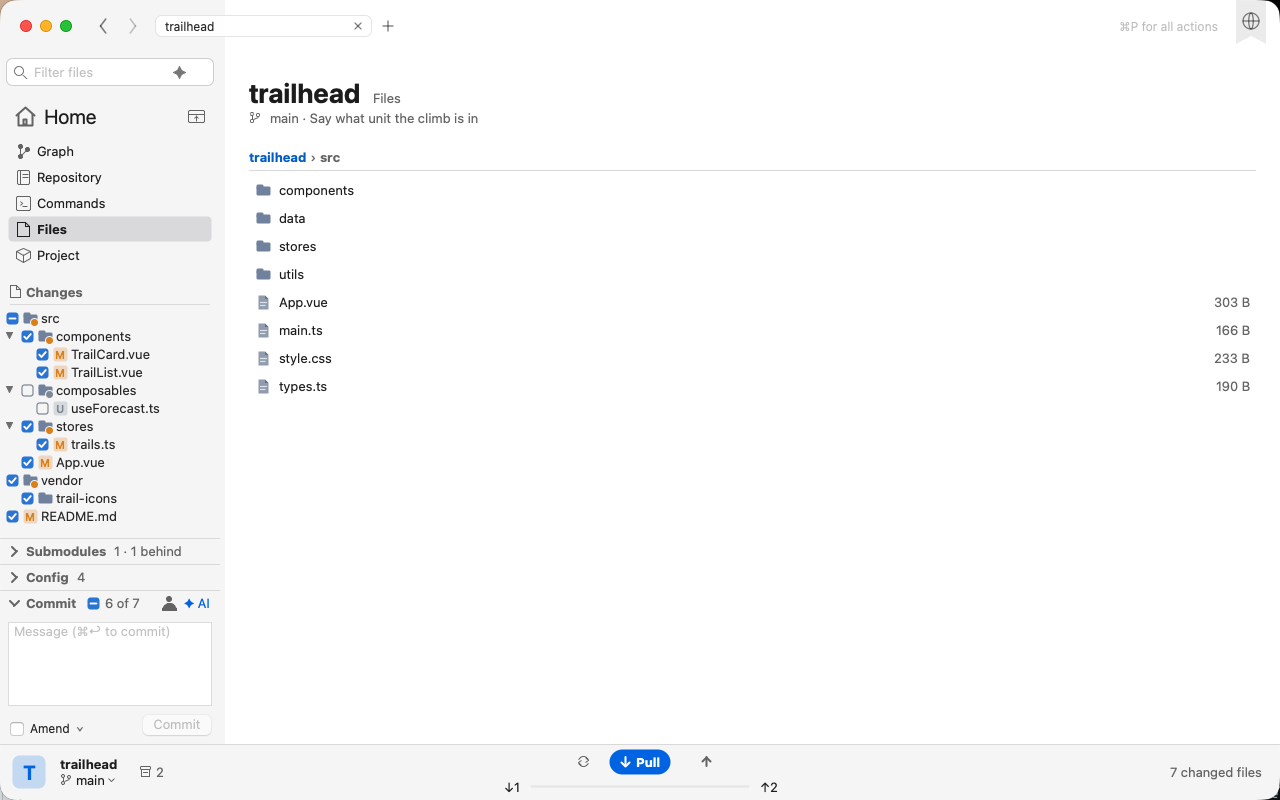
Files in the sidebar, or ⌘⌥5, shows the tree of HEAD one folder at a time, with crumbs leading back up. Browse Files… on a commit, a tag or a reflog entry opens it as it was then. A file opens read-only in the editor under its lexer, an image scaled to fit, and Open or Save As takes it out.
The Files page of trailhead at main, Say what unit the climb is in: crumbs trailhead › src over the folders components, data, stores and utils and the files App.vue, main.ts, style.css and types.ts with their sizes, and Files marked in the sidebar
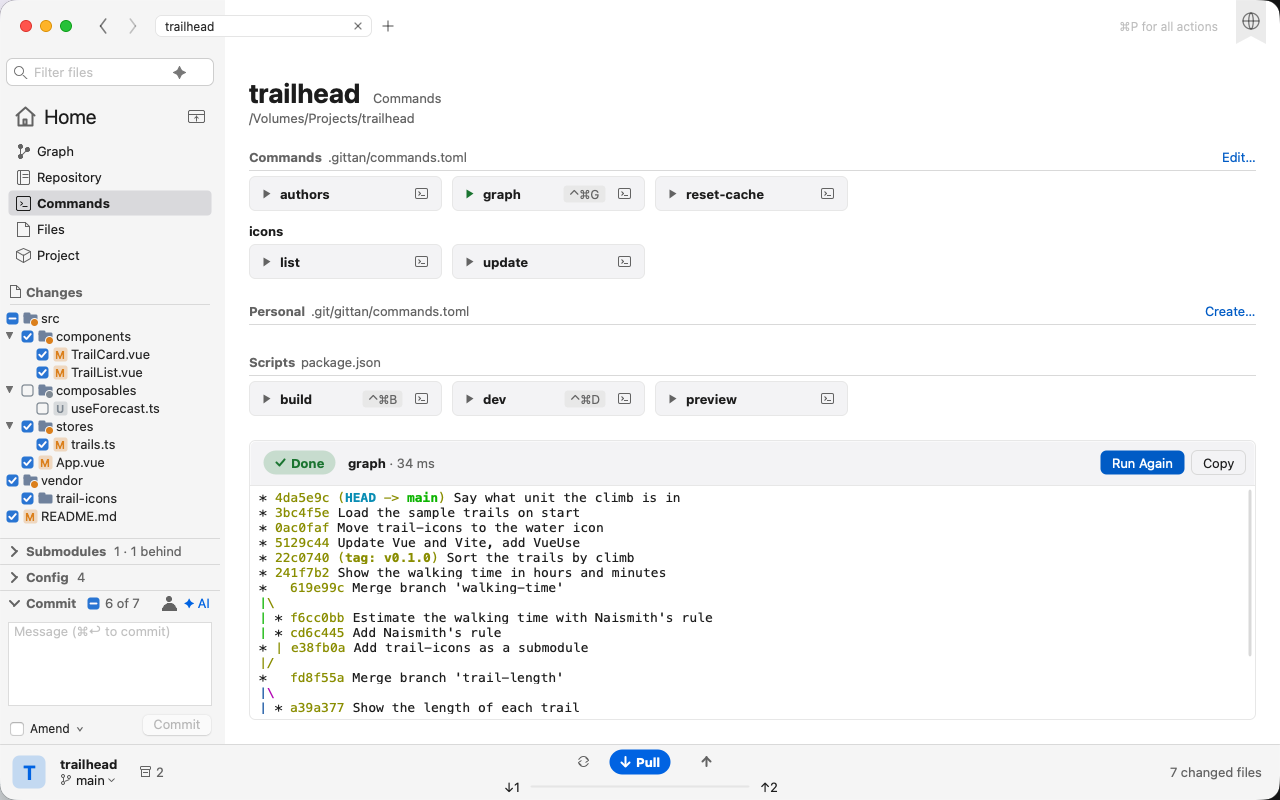
Commands in the sidebar, or ⌘⌥4, turns a repository's own commands into tiles: the scripts of package.json, the targets of a Makefile, the commands of the project's own tools, and what .gittan/commands.toml adds, commands that share a name before a colon grouped together. Commands of your own go in .git/gittan/commands.toml, never committed, under Personal. A click runs one in the root, with its output in a panel under the tiles that tells its state and time and offers Stop, Run Again and Copy; the terminal mark runs it in your own terminal instead. A key from the file runs it from any view with ⌃⌘, once you have trusted the file.
The Commands page of trailhead: authors, graph and reset-cache from .gittan/commands.toml, its icons:list and icons:update grouped under icons, an empty Personal section for .git/gittan/commands.toml with Create…, and build, dev and preview from package.json, each with its shortcut and terminal mark, and under them the output of graph, Done in 34 ms, a colored git log graph, with Run Again and Copy
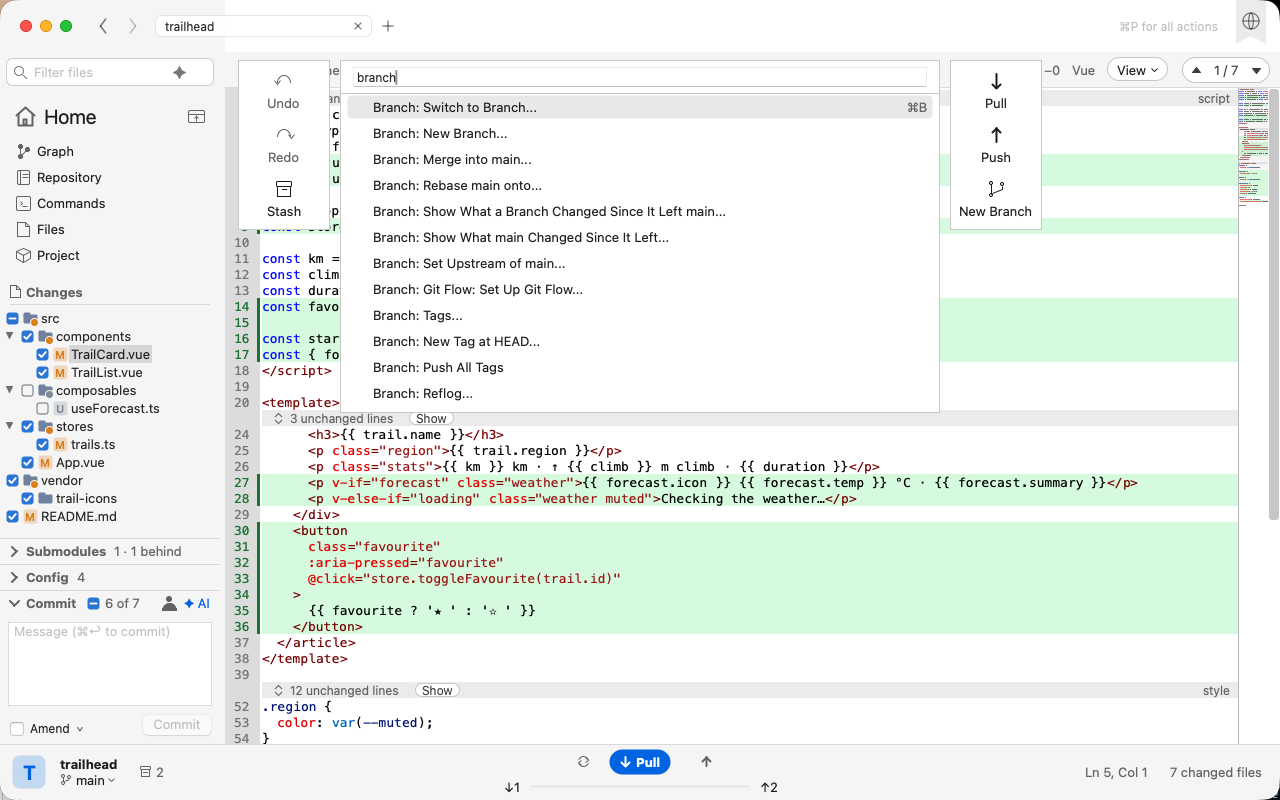
The command palette (⌘P) lists every action the menus offer right now, filtered by the words you type in any order, with the ones you used last first. Undo, Redo and Stash stand to its left, Pull, Push and New Branch to its right.
The command palette over TrailCard.vue filtered by branch: Switch to Branch with ⌘B, New Branch, Merge into main, Rebase main onto, Git Flow and the rest of the Branch menu, with Undo, Redo and Stash in a column on the left and Pull, Push and New Branch on the right
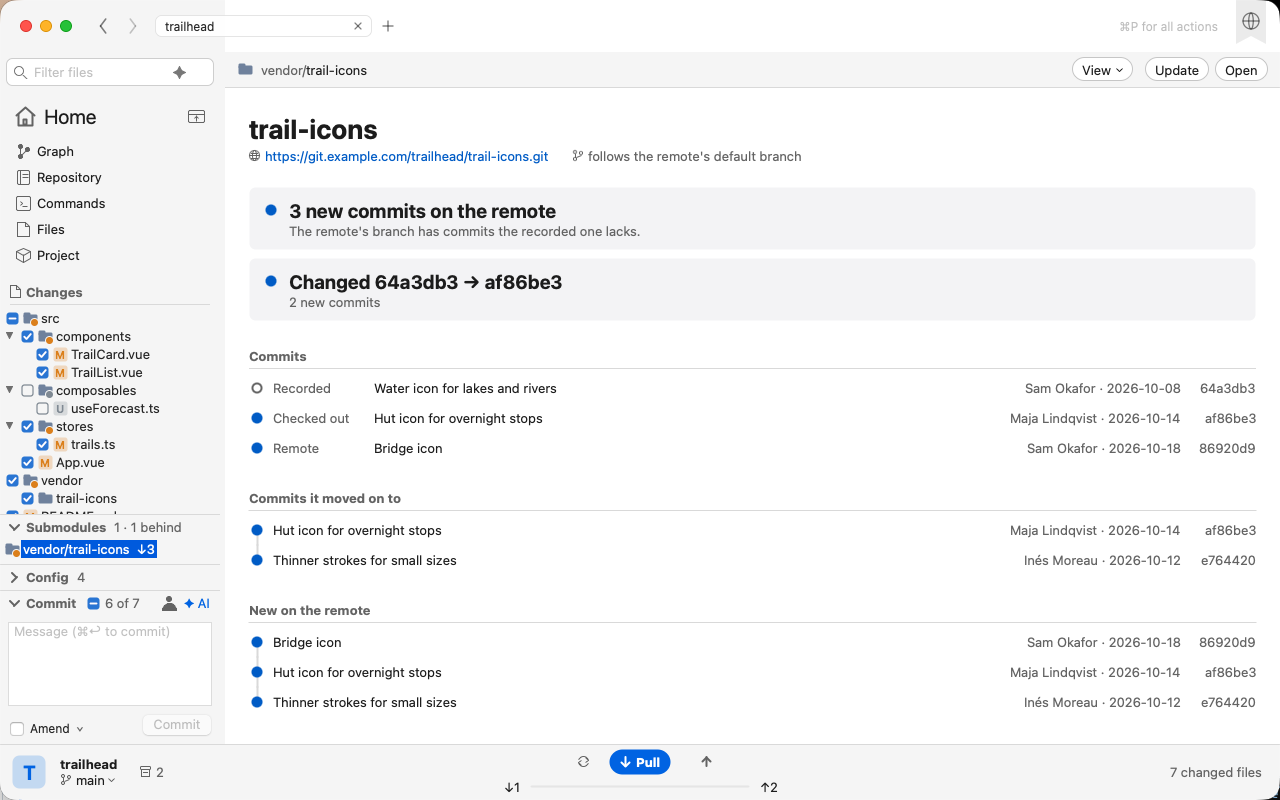
Submodules get a section and a page of their own. Gittan asks each remote for new commits, and the page shows what a submodule moved to, what it no longer has and what is new on the remote, with Update when the checkout is not the recorded commit.
The page of the trail-icons submodule: its URL and the branch it follows, cards for 3 new commits on the remote and Changed 64a3db3 to af86be3, the recorded, checked-out and remote commits, the two commits it moved on to and the three new on the remote, and Update and Open in the header
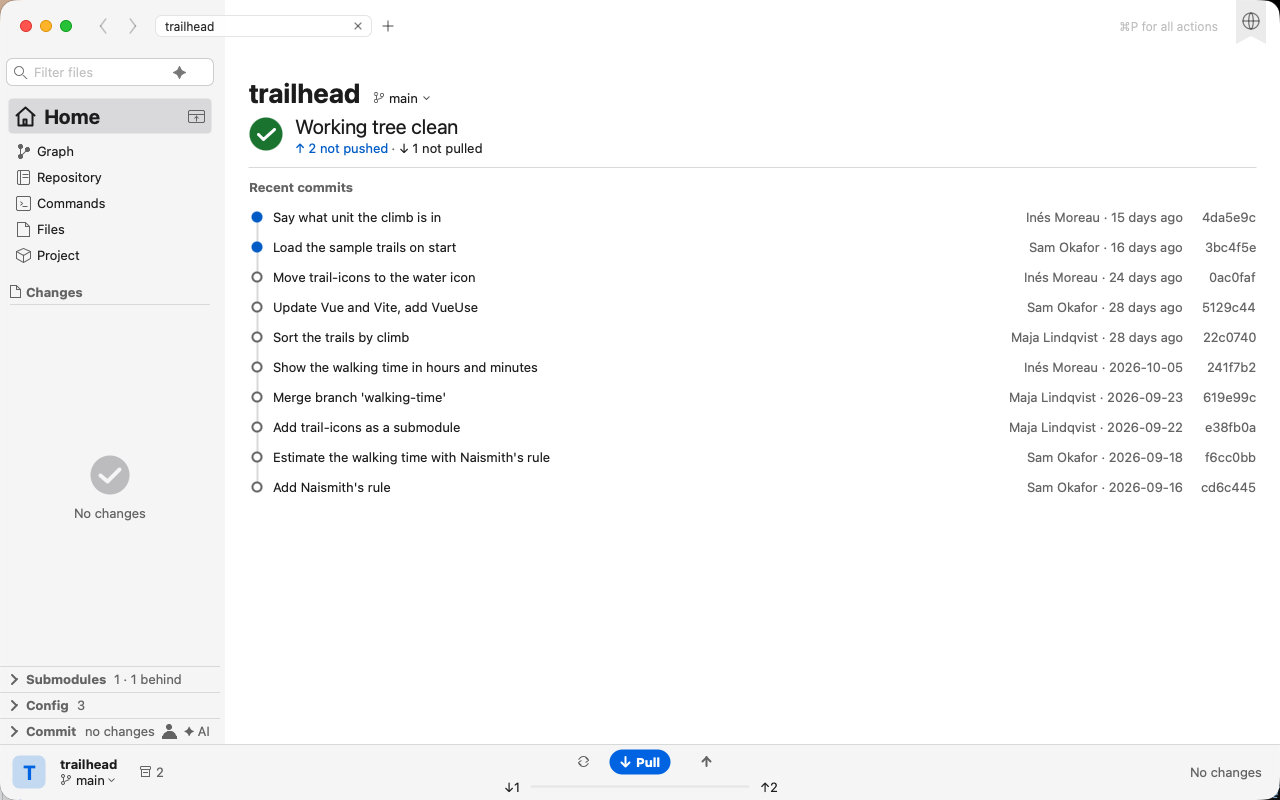
A clean tree says so, in the summary and in the empty file list, and tells how far the branch is from its upstream. The commits not pushed yet are marked in the list under it.
The summary of a clean working tree: a green check, two commits not pushed and one not pulled, the ten newest commits with the two unpushed ones marked, and a gray check with No changes in the empty file list
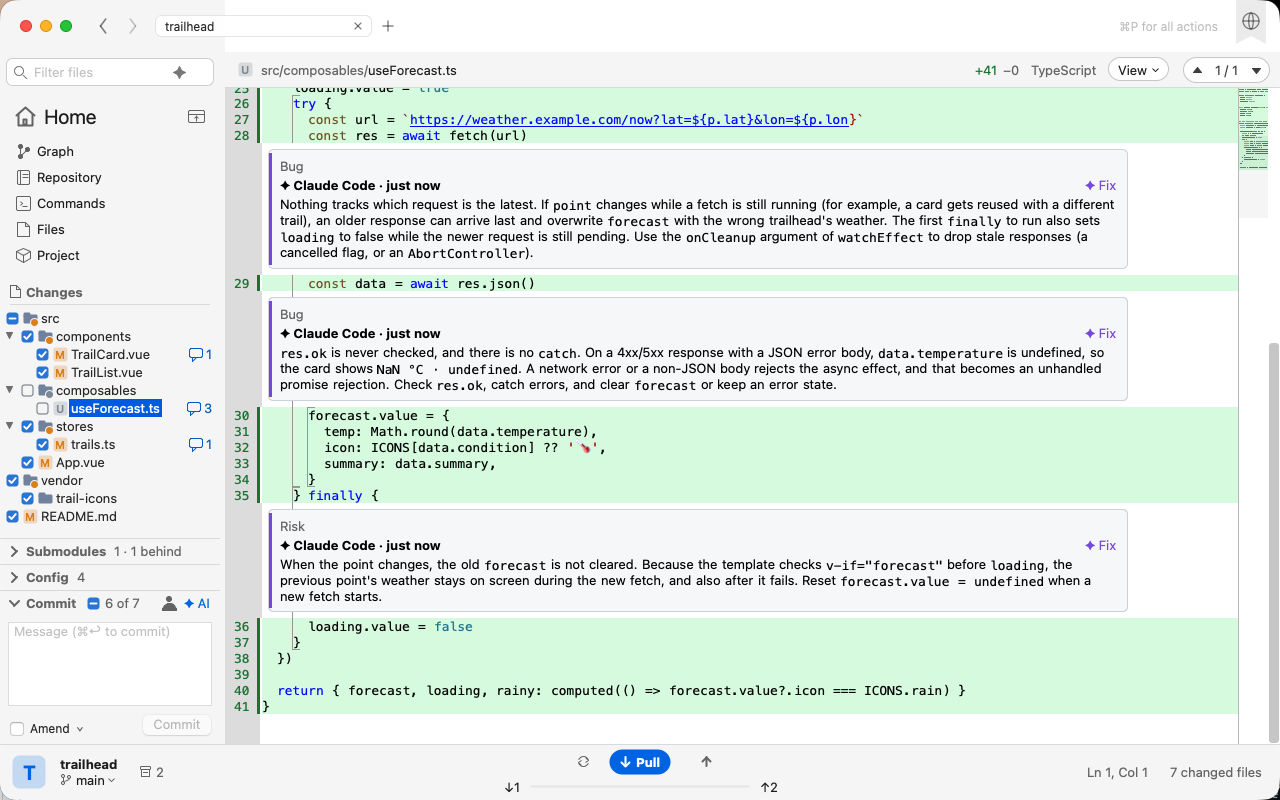
AI review is optional and off until you turn it on in the settings. Then it runs Claude Code or GitHub Copilot with your own sign-in, or a model behind an OpenAI-compatible API with your own key, on what the diff compares. View > Review Changes with AI, or ⌘⌥R, puts what it finds under the lines it is about, as bugs, risks or questions, beside a pull request's comments, and ✦ Fix on a finding has the agent fix it. ✦ AI in the Commit section writes the message for the ticked files.
The new file useForecast.ts with three cards from Claude Code under its lines, each with ✦ Fix: a Bug saying two fetches race and the older answer can win, a Bug saying res.ok is never checked, and a Risk saying the old forecast stays on screen while a new one loads; the tree counts 3 findings on useForecast.ts and 1 each on TrailCard.vue and trails.ts

Then commit it

Commit, sync and merge, from the diff

The work that follows a change happens where you read it. Anything that would throw work away asks first, and nothing is merged or rebased unless you ask for it. The whole workflow has eighteen views.

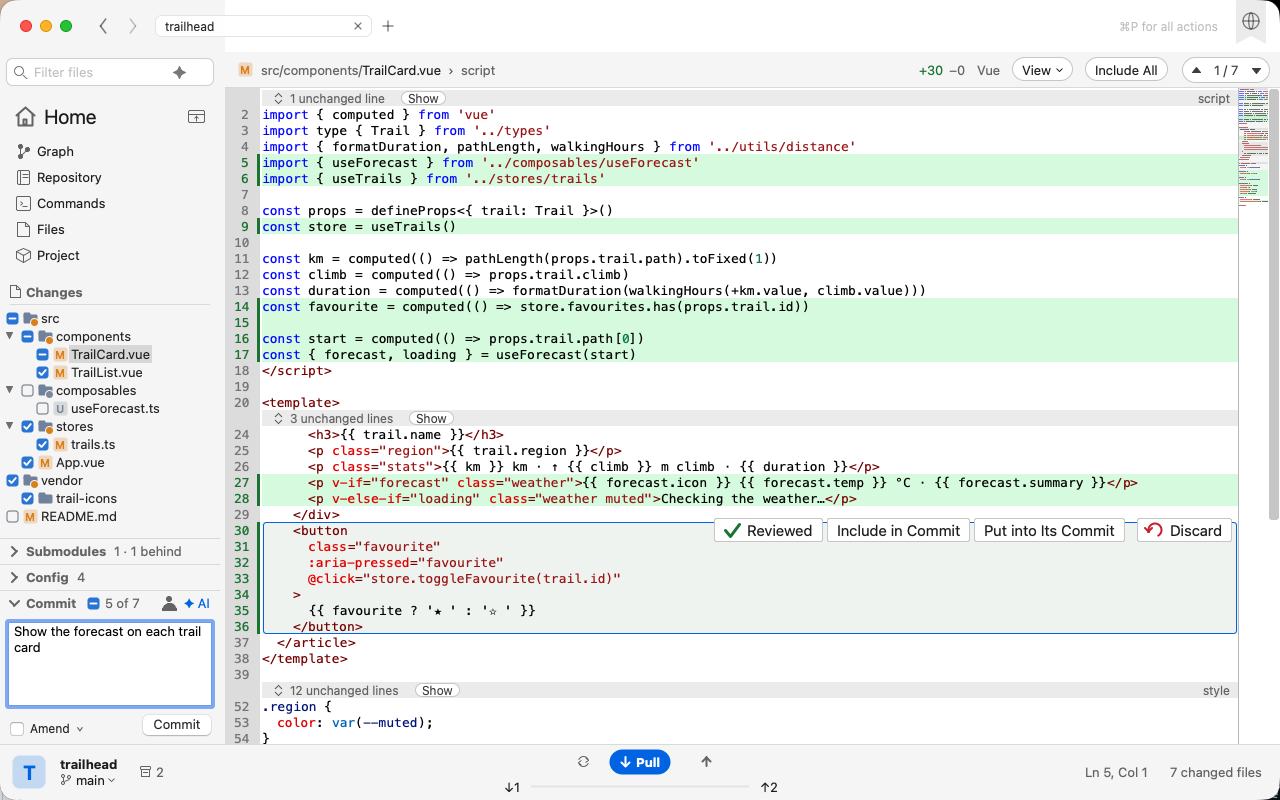
  1. TrailCard.vue changed in the diff view with the button block left out of the commit in a muted tint and Reviewed, Include in Commit, Put into Its Commit and Discard pills over it, the file's box in the tree half ticked, README.md unticked, Include All in the file header, and the Commit section with a message and the Commit button

    Commit what you ticked

    Tick the files that belong together and commit with ⌘↩, or commit a block, or only the lines you select, line by line, and leave the rest for the next commit. There is no index to think about.

    Committing, in the workflow
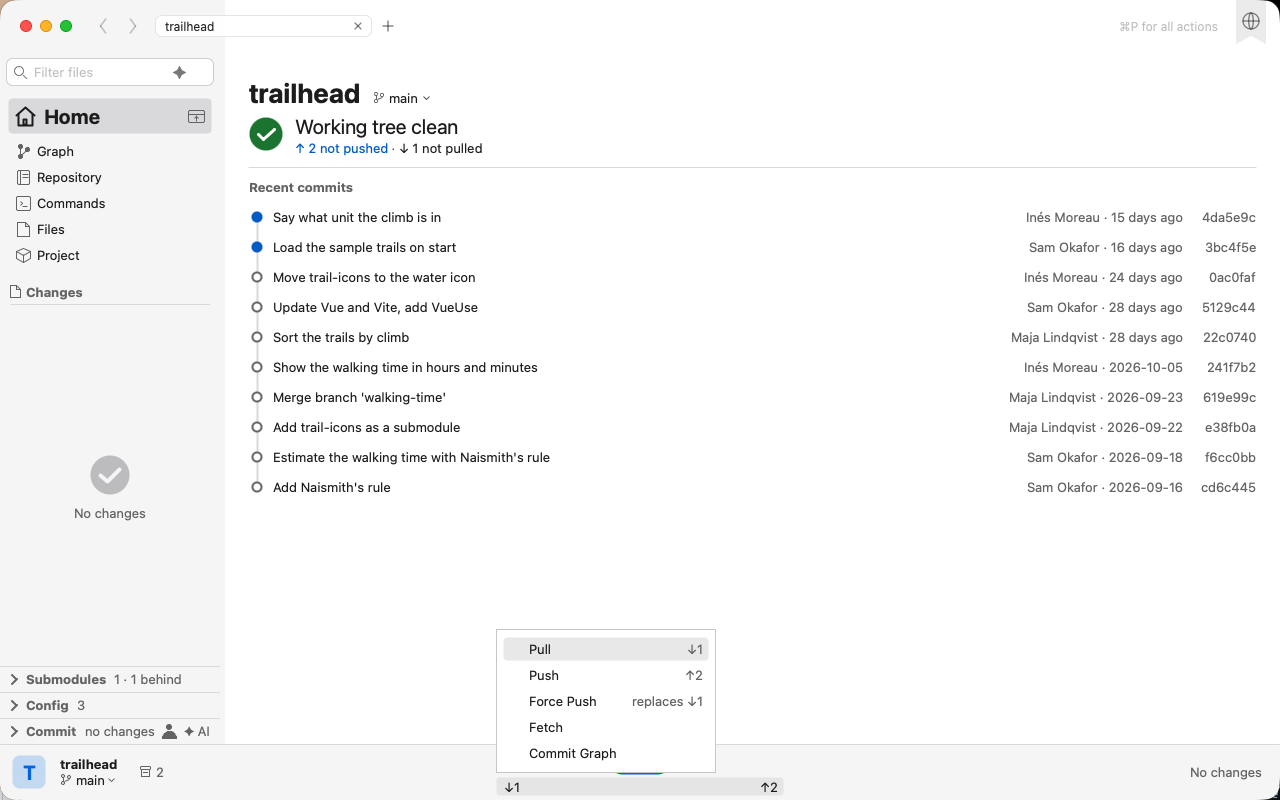
  2. The list over the status bar with Pull (one behind), Push (two ahead), Force Push replacing one, Fetch and Commit Graph

    Pull and push from the status bar

    Its middle button is always the next step: Pull here, with one commit behind and two ahead. Force Push takes a lease and says how many of the remote's commits it replaces, and with gh signed in the branch's pull request and its checks sit beside them.

    Pull and push, in the workflow
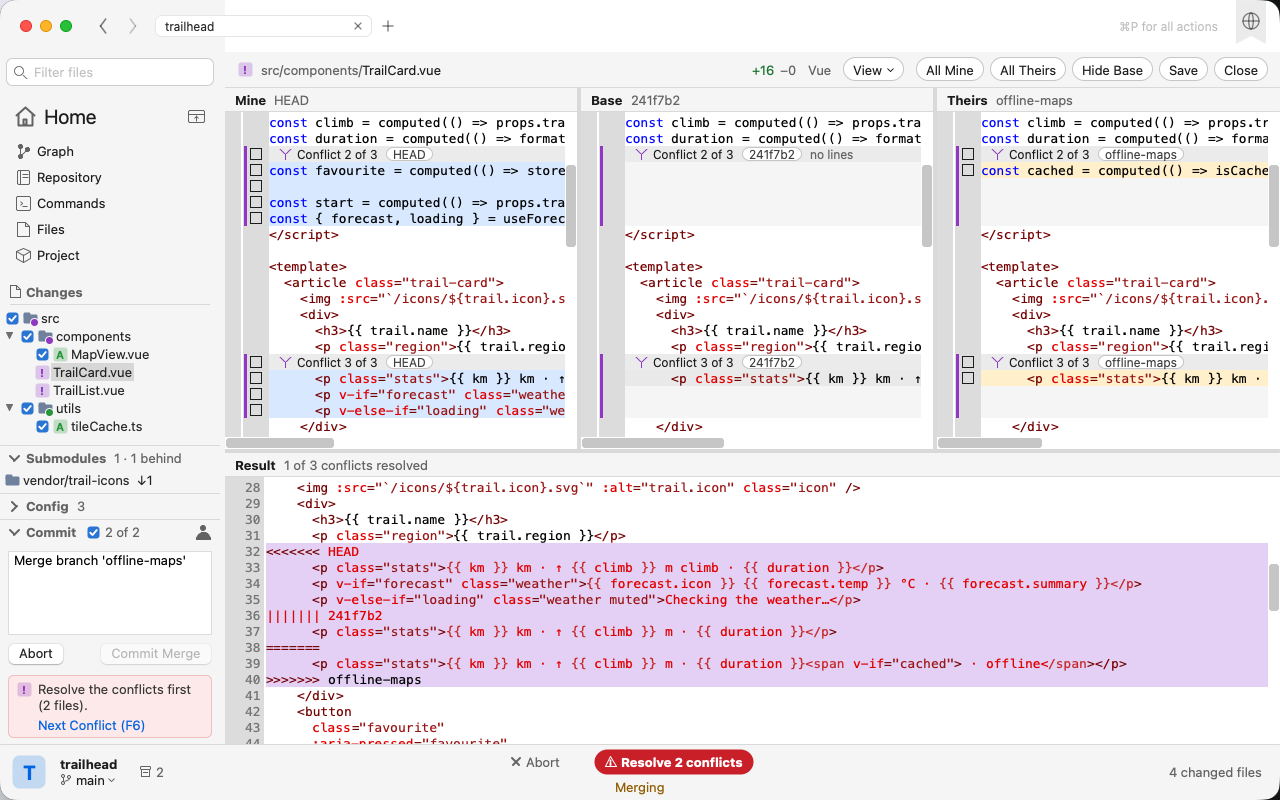
  3. The merge editor on TrailCard.vue with the base shown: Mine at HEAD, Base at 241f7b2 and Theirs on offline-maps side by side, each conflict headed by a fork, Conflict 2 of 3 and the side's name as a pill, the second conflict with no lines in the base and the third with the stats line both sides started from, check boxes on each side's lines, Hide Base in the header, and the Result pane under them, 1 of 3 conflicts resolved, with the third conflict's markers holding the base's line

    Resolve what conflicts

    A merge that stops names its conflicts. Use Mine, Use Theirs, or the merge editor: yours and theirs side by side, the result under them, conflict by conflict, and Branch > Undo if it was a mistake.

    The merge editor, in the workflow

Download

Get Gittan

Packaged builds for every platform are on the Releases page. Pick the file for your system.

macOS Your system
Apple Silicon · Gittan-macos-silicon.dmg
Download .dmg
Windows Your system
x64 · Gittan-windows-x64-setup.exe
Download installer
Without installing: Gittan-windows-x64.zip
Windows on Arm, native: .zip
Linux Your system
amd64, GTK 3 · Gittan-linux-amd64.deb
Download .deb
arm64, Raspberry Pi: .deb · .rpm · .tar.gz
Haiku Your system
x86_64, Qt 6
FreeBSD Your system
amd64, GTK 3 · 15.1 or later
Before you install
  • GitGittan runs the git command line tool, so git 2.30 or later must be installed and on your PATH.
  • WindowsThe Windows installer needs no administrator for yourself alone, and adds Open in Gittan to folders' menu and the gittan command; it is not signed, so SmartScreen warns at first: More info, then Run anyway. The x64 build runs on Windows 11 on Arm too, emulated; Gittan-windows-arm64.zip runs there natively.
  • LinuxOn Linux the .deb (Debian, Ubuntu, Raspberry Pi OS 64-bit) and the .rpm (Fedora, openSUSE) put Gittan in the desktop's menu with its icon, and the .tar.gz runs where you unpack it; all use GTK 3, which every common desktop already has.
  • macOSThe macOS build is signed ad hoc, so macOS blocks it at first: drag it to Applications, then run xattr -cr /Applications/Gittan.app in Terminal.
  • HaikuOn Haiku (64-bit), Gittan-haiku-x86_64.hpkg is a package: pkgman install Gittan-haiku-x86_64.hpkg brings Qt 6 and git with it, and Gittan is then in the Deskbar menu under Applications. Without installing, Gittan-haiku-x86_64.tar.gz runs where you unpack it and needs Qt 6: pkgman install libqt6pas.
  • FreeBSDOn FreeBSD 15.1 or later (amd64), Gittan-freebsd-amd64.tar.gz runs where you unpack it and needs GTK 3 and git: pkg install gtk3 git. The Windows on Arm, Haiku and FreeBSD builds are added to a release when they build, so the newest release may lack one; the Releases page then has the latest that has it.
  • Other versionsEvery release, with what changed in it, is on the Releases page. To try changes before they are released, open the newest run on GitHub Actions and download the file for your system under Artifacts, which needs a GitHub account.